Array in JavaScript

what is array?
-array is collection of mixed values, such as string, number, boolean... etc -array is an object that can store multiple values at once. -The array name must be a unique symbolic name.
specialty of array:
-array is dynamic in size and auto growing, it means no need to specify array size.
- Since arrays are objects, the array elements are stored by reference. Hence, when an array value is copied, any change in the copied array will also reflect in the original array.
how to create array?
Array can be created into 2 ways:
1. easiest way to create an array is by using an array literal []. example:
let superhero=["hulk", "wanda", "thor", "vision"];
console.log(superhero);
output:
["hulk", "wanda", "thor", "vision"]
2.Using the new keyword example:
let superhero= new array("ironman", "spiderman");
console.log(superhero);
output:
("ironman", "spiderman")
NOTE : It is recommended to use literal array to create an array.
Examples
// empty array
let myList = [ ];

// array of numbers
let numArray = [ 1, 2, 3, 4];

// array of strings
let stringArray = [ "eat", "work", "sleep"];

// array with mixed data types
let Data = ["work", "exercise", 1, true];
Array using objects :
let obj={
        firstname: "abc" ,
        lastname: "xyz",
 };
Functions in array :
let func={
     function hello(){
      console.log("hello");
    }
}
Storing multiple values in array :
-We can store functions, objects along with array elements inside an array.
let data = [
    {'task1': 'exercise'},
    [1, 2 ,3],
    function hello() { console.log('hello') }
 ];
Array Index:
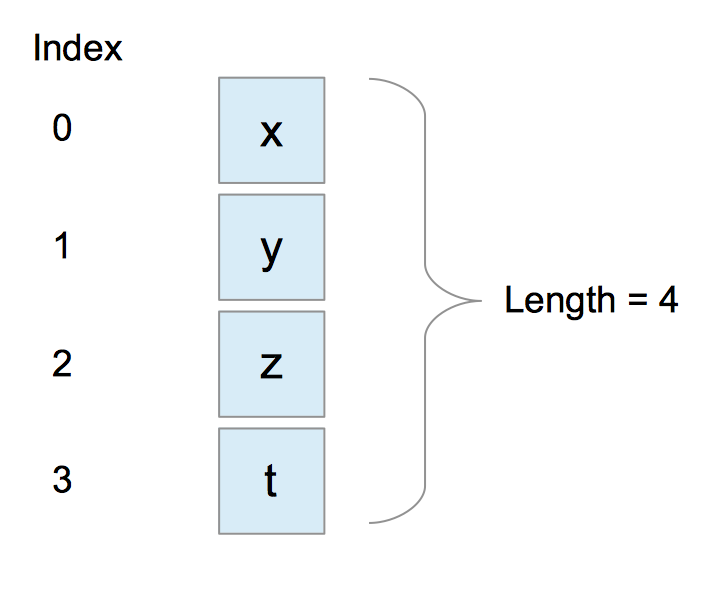
The index indicates the position of the element within the array.
Index of an array always Zero-indexed.
Accessing array elements :
array elements are accessed using index values.
if we say array_name[1] it points to element 'y'.
Add an element into array :
- we can use built in method to add elements into the array
- push() - Adds element at the end of array.
- unshift() - Adds element at the beginning of the array.
Push()
let marvel= ["spiderman", "hulk", "wanda"];
console.log(marvel);
marvel.push("ironman");
console.log(marvel);
output:
 ["spiderman", "hulk", "wanda"]
 ["spiderman", "hulk", "wanda", "ironman"]
unshift()
let marvel=["spiderman", "hulk", "wanda"];
console.log(marvel);
marvel.unshift("ironman");
console.log(marvel);
output:
["spiderman", "hulk", "wanda"]
["ironman", "spiderman", "hulk", "wanda"]
undefined value :
- Suppose, an array has two elements. If we try to add an element at index 3 (fourth element),the third element will be undefined. For example,
let hero=["batman", "superman"];
console.log(hero);
hero[3]="aquaman";
console.log(hero);
output:
["batman", "superman"]
["batman", "superman", undefined, "aquaman"]
Removing element from array
built in methods are used to remove elements from array.
pop() - removes last element of array.
shift() - removes first element of array.
pop()
let marvel= ["spiderman", "hulk", "wanda", "ironman"];
console.log(marvel);
marvel.pop();
console.log(marvel);
output:
["spiderman", "hulk", "wanda", "ironman"]
["spiderman", "hulk", "wanda"]
shift()
let marvel=["spiderman", "hulk", "wanda", "ironman"];
console.log(marvel);
marvel.shift();
console.log(marvel);
output:
["spiderman", "hulk", "wanda", "ironman"]
[ "hulk", "wanda", "ironman"]
Array length
using this property we can find length of array.
example
let marvel=["spiderman", "hulk", "wanda"];
console.log(marvel.length);
output
3
Array using named key
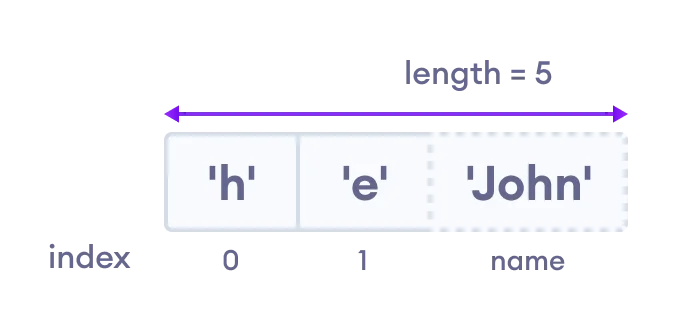
- we can also store values by passing a named key in an array.
let hero = ["h", "e"];
hero.name = "john";

console.log(hero);
console.log(hero.name);
console.log(hero["name"]);
Array methods
In JavaScript, there are various array methods available that makes it easier to perform calculations.
Some of the commonly used JavaScript array methods are:
concat() -joins two or more arrays.
indexOf() -searches an element of an array and returns its position.
find() -returns the first value of an array element.
findIndex() -returns the first index of an array element.
forEach() -calls a function for each element.
includes() -checks if an array contains a specified element.
push() -adds a new element to the end of an array and returns the new length of an array.
unshift() -adds a new element to the beginning of an array and returns the new length of an array.
pop() -removes the last element of an array.
shift() -removes the first element of an array.
sort() -sorts the elements alphabetically in strings and in ascending order.
slice() -selects the part of an array and returns the new array.
splice() -removes or replaces existing elements and/or adds new elements.

